When you type “What is Claude AI?” into Google, you typically find the same four surface-level sentences across tech blogs: it is an AI chatbot developed by Anthropic that writes text. While that definition works for a casual user, it falls short for growth teams and engineers searching for high-performing Claude AI for Marketers and builders to scale real-world workflows. The most effective mental model is to treat Claude AI as a structured reasoning engine rather than a simple lookup database. While standard search engines retrieve static data, Claude processes complex problems using deep contextual inputs—whether you feed it a multi-page brand voice guideline, competitor gap analysis, dynamic code repository, or raw customer interview transcripts. Understanding this fundamental difference shapes how you prompt the model, what quality of output you can expect, and how you evaluate Claude AI vs ChatGPT, Gemini, Perplexity, Copilot, or Llama. In this comprehensive guide to Claude AI for Marketers and builders, we break down everything you need to dominate your niche: Foundations & Core Architecture: What Claude AI Actually Is Claude AI is a family of AI models and applications built by Anthropic, an AI safety and research company founded in 2021 by former OpenAI researchers, including siblings Dario and Daniela Amodei. Claude can hold extended conversations, draft and edit long-form content, analyze documents and images, write and debug code, and carry out multi-step tasks inside connected apps and tools. At a technical level, Claude AI works like other large language models: it’s trained on enormous volumes of text and learns to predict the next unit of language in a sequence. That mechanism is what lets it write, summarize, translate, and carry a coherent argument across thousands of words. What separates Claude from a generic autocomplete engine is how it uses that mechanism — holding onto instructions, tone, and constraints across a genuinely long interaction instead of drifting after a few paragraphs. Anthropic’s Safety-First Philosophy Anthropic is headquartered in San Francisco and frames its mission around building reliable, interpretable, and steerable AI systems. That is not just marketing language — it shows up directly in day-to-day Claude AI features. When testing Claude AI vs ChatGPT, Claude AI tends to be more conservative than some competing chatbots when a request is ambiguous or carries real-world risk, and it is explicit about uncertainty rather than confidently guessing. For agencies and in-house teams analyzing what is Claude AI and putting it in front of client work, that trade-off is worth knowing before you build a dependency on it: you get more caution, not less How Claude Handles Massive Context Windows Context window size is the single biggest practical differentiator between AI tools, and it is among the most vital Claude AI features that most beginner guides skip. Claude AI’s flagship models — Sonnet 5 and Opus 5 — support up to a 1 million token context window on paid plans, according to Anthropic’s own documentation. Haiku 4.5, the fastest and cheapest model in the lineup, runs a 200,000 token window. In plain terms, a million tokens is roughly 750,000 words — enough to hold an entire codebase, a full year of internal documentation, or dozens of long-form articles in a single conversation. In any practical comparison of Claude AI vs ChatGPT, this means you can paste in a client’s entire brand style guide, three competitor teardown documents, and a full keyword matrix in one go, and Claude AI will reason across all of it at once instead of forgetting the brand guide by the time it reaches the keyword list. That is the foundational reason behind what is Claude AI and why the model performs so differently from a “write me a blog post” one-line prompt — the model is not limited by memory the way a shorter-context tool is, making these massive memory capabilities standard across all advanced Claude AI features. Claude AI Features and Capabilities: A Deep-Dive Breakdown Here’s a functional breakdown of what’s actually inside Claude AI today, beyond the chat box. Chat & Writing The core experience: long-form content drafting, editing, brainstorming, and document or image analysis, available on web, iOS, Android, and desktop. This is where most marketers spend the bulk of their time, and where Claude AI’s context handling shows up most directly — holding tone and structure consistently across a 2,000-word pillar page instead of degrading into generic phrasing by paragraph six. Claude Code An agentic coding tool that builds, debugs, and refactors software from plain-language instructions rather than requiring you to write every line yourself. It runs in the terminal, in IDE integrations, and inside the desktop app, and it shares its usage pool with the rest of a Claude subscription. For technical marketers and builders, this is the bridge between “I have a content strategy” and “I have a working landing page or schema implementation.” Claude Cowork An agentic assistant built for non-developers that works directly inside your files, folders, and connected apps to complete multi-step tasks — organizing a messy folder, building a spreadsheet with working formulas, or drafting a set of documents from raw notes. Where Chat is a conversation, Cowork is a working session: you describe the outcome, and Claude plans and executes it, checking in with you at key decision points rather than requiring step-by-step instructions. Artifacts A dedicated space for generating and iterating on a single reusable output — a document, a piece of code, an interactive prototype — separate from the back-and-forth of the chat itself. For content teams, this is where a drafted article, a data visualization, or a client-facing deliverable actually lives and gets refined. Projects Projects let you organize related chats, documents, and instructions into one persistent workspace. Instead of re-explaining a client’s brand voice or a campaign’s keyword strategy in every new conversation, you set it once at the project level and every chat inside that project inherits the context. Memory & Skills Memory lets Claude retain relevant context across separate sessions rather than starting from zero every
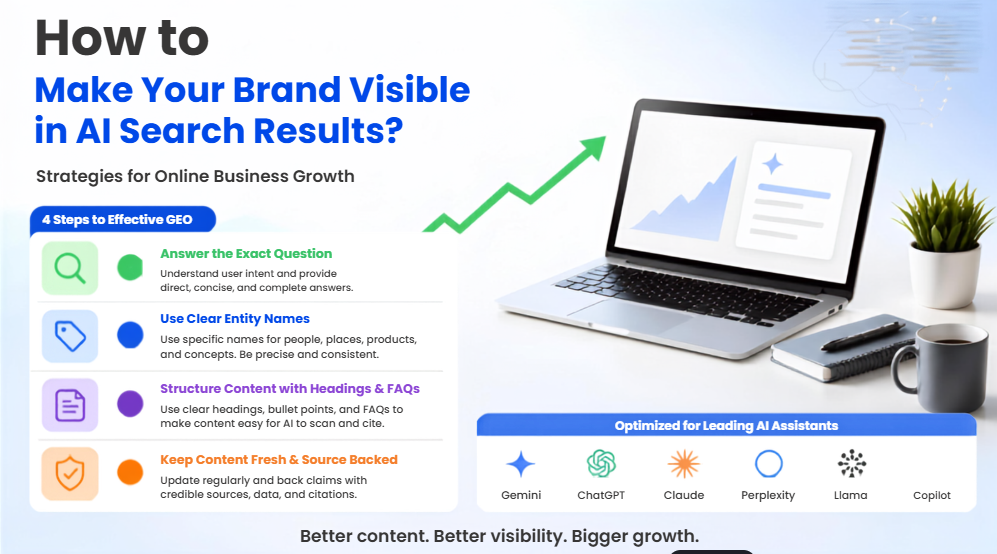
Learning how to make your brand visible in AI search results is very important nowadays. More and more people are using chatbots like ChatGPT, Gemini, Claude and Perplexity of traditional search engines like Google. Think about how you search for things. When was the last time you used a chatbot to find something of looking through lots of Google links? Your potential customers are doing the thing. That is why Generative Engine Optimisation or GEO is so important. If you have ever asked ChatGPT or Perplexity to recommend a tool in your category and your brand was not mentioned, even though you are on the page of Google you are not imagining things. Learning how to make your brand visible in AI search results is one of the important jobs in marketing today. I have spent a lot of time working on this problem. I have run GEO campaigns for B2B SaaS clients. Here is what actually works, based on campaigns and mistakes. What Is GEO and How Is It Different from SEO? GEO is the practice of making sure your brands content and website are structured so that AI systems like ChatGPT and Perplexity mention you when answering a users question. Traditional SEO is about making sure Google thinks your page is relevant to a query. GEO is about making sure the whole web ecosystem thinks your brand is a fact. That is a difference. Traditional search engines rank pages. Generative engines read a question find pieces of text from across the web and put them together into an answer only citing sources they trust. One of my clients a B2B SaaS company had rankings on Google but was not mentioned in AI answers. We changed that by restructuring their footprint. We focused on three things: information gain, entity authority and citation readiness. We rebuilt their website to answer questions directly. We made sure their brand was consistent across the web. We got mentions from sources like review websites and Reddit. Within a weeks the brand was cited as a top recommendation in Perplexity and ChatGPT Search. Their comparison tables were cited in Google AI Overviews. Traffic from AI platforms converted to demos at a rate than standard organic traffic. The C.A.R.E. Framework: A DIY AI Search Audit This is the framework I use to audit a brand’s AI search visibility, and you can run it across your top five landing pages in under 30 minutes. Phase What to Check Pass / Fail Criteria C – Crawl & Render robots.txt and server-side HTML Are GPTBot, PerplexityBot, ClaudeBot, and Google-Extended allowed? Does your core text appear in the raw page source without JavaScript execution? A – Answer Architecture Information gain and extractability Does every key H2 open with a self-contained answer (40–60 words)? Are comparisons in structured tables rather than prose? R – Reputation Consensus Third-party footprint Do independent reviews on Reddit, G2, or Trustpilot confirm the same features your site claims? E – Entity Disambiguation Schema and knowledge mapping Is nested JSON-LD schema live, with validated sameAs links to your official profiles? The 10-Minute “Money Prompt” Test Once you have completed the technical diagnostics within the C.A.R.E. checklist, the next critical phase is learning how to make your brand visible in AI search results through an empirical audit across live environments. Running simulated queries provides immediate, ground-level feedback on how to make your brand visible in AI search results while revealing exact blind spots in your organic retrieval footprint. Theoretical optimisation only goes so far; understanding how to make your brand visible in AI search results by observing how large language models parse, synthesise, and attribute your market category in real time is what separates actionable GEO from guesswork. Step 1: Formulate High-Intent Commercial Prompts Begin by documenting five to ten high-intent conversational prompts that genuine prospective buyers use when evaluating software, services, or solutions. Rather than testing short-tail navigational queries, focus on deep-funnel comparative and exploratory phrasing to test how to make your brand visible in AI search results: Drafting precise prompts helps evaluate how to make your brand visible in AI search results where commercial purchase intent is highest. Step 2: Execute Multi-Platform Retrieval Audits Take your structured prompt list and run each query systematically across major generative engines to uncover how to make your brand visible in AI search results: Testing multiple interfaces ensures your playbook on how to make your brand visible in AI search results accounts for differing retrieval algorithms, index refresh rates, and context window limits. Step 3: Analyze Attribution and Reverse-Engineer Cited Competitors Examine the synthesised output with analytical scrutiny to discover new ways regarding how to make your brand visible in AI search results: Reverse-engineering cited competitor URLs provides an exact blueprint for how to make your brand visible in AI search results by highlighting the exact formats, data tables, and third-party validation points models prefer. Step 4: Continuous Benchmarking and Gap Remediation When a page buries core data beneath introductory fluff or lacks an authoritative web-wide reputation footprint, generative retrieval pipelines consistently favor competing domains with clearer information architecture. Document your findings in a quarterly tracking sheet to master how to make your brand visible in AI search results: Conducting this diagnostic quarterly ensures that as conversational algorithms evolve, your operational strategy on how to make your brand visible in AI search results remains robust, factual, and consistently cited by every major AI engine. 5 GEO Myths That Are Costing You Citations Myth 1: “If you rank #1 on Google, AI engines will automatically cite your business.” This remains the most pervasive and expensive assumption in modern search marketing. Independent studies reveal that fewer than 30% of web sources referenced by generative platforms like ChatGPT Search and Perplexity overlap with Google’s top ten organic search positions. Traditional search algorithms prioritize backlink profiles and domain age, whereas conversational engines prioritize structured data blocks and direct factual relevance. When researching how to make your brand visible in AI search results, relying
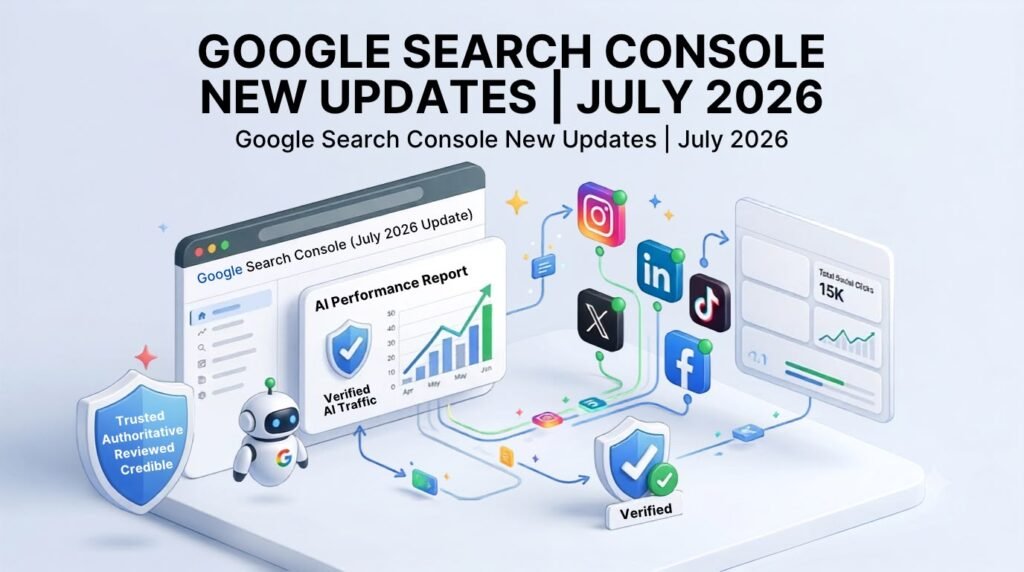
Google Search Console new updates in 2026 have changed the way we look at SEO performance. If you have logged into your dashboard recently, you have probably noticed things look quite different. The dashboards are more crowded, there is AI-flavored language everywhere, and if you are in charge of an e-commerce site or a content-heavy blog, your impression graphs might be doing things you were not expecting. I started watching these Google Search Console updates closely in early Q1 2026 around the time Google introduced deeper AI-driven search performance metrics and improved real-time indexing insights. One of our e-commerce clients had a shift in impression data during that release. The new reporting made it much easier to see which parts of the site were adapting well to Google’s updated intent-matching algorithms and which needed attention. That visibility allowed us to change the content strategy fast, and the client got back the traffic they had lost—they ended up with more overall organic visibility a few weeks later. This post goes through what these updates mean in practice based on that experience and a few others since rather than just repeating Google’s release notes. Understanding the Shift in AI Performance Tracking To effectively navigate the Google Search Console New Updates in 2026, it helps to understand why the interface feels so different. Google is no longer just reporting on simple blue-link SERP results; the system is built to evaluate generative search visibility, real-time indexing feedback, and brand authority across multiple platforms. When reviewing data inside the Google Search Console New Updates in 2026, site owners now have access to metrics that break down how search algorithms parse conversational content. Instead of focusing purely on organic rank position, the new reporting structure highlights: By leveraging these new dimensions within the Google Search Console New Updates in 2026, you can quickly identify which sections of your site are generating passive visibility and adjust your content layout to convert those interactions into active website traffic. The Metric Most People Are Reading Wrong The biggest surprise in the new reporting is the difference between Generative Impression Share and User Click Attribution—and almost no one is looking at it correctly yet. Here’s the issue. When Google’s AI pulls your content directly into an AI Overview, your impressions can go up a lot. Clicks don’t always come, because the user already has their answer. They never needed to go to your page. Most site owners see impressions and think traffic is on the way. It usually is not—not automatically. The real chance is in looking at the AI Contextual Triggers in that report: the specific schema markup and conversational subheadings the AI is using to determine your page are worth citing. Once you know what is causing the citation, you can make your content so that being *cited* also means being *visited*. A Real Example: Changing Citations Into Clicks One of our blog posts was being used often in AI Overviews, but organic clicks were dropping because the AI was summarising our conclusion for the reader. There was nothing left to click on. Here’s what we did: 1. Changed the H2S and H3s into Problem–Solution” pairs instead of flat statement headers. 2. Added a CTA right after the section most likely to be used in a featured snippet. 3. Held back the actionable takeaway—gave a high-level summary in the text, then paired it with an interactive prompt (“Calculate your specific ROI using our interactive checklist below”). The AI still cited the page as the source. Now the citation pointed to a tool the AI couldn’t replicate inline. Users had a reason to click. That single change increased CTR from AI search by over 18% with no drop in ranking position. GSC Social Media Property Tracking: Useful. Not Real-Time Yet The other big addition worth mentioning is GSC Social Media Property Tracking. I have a social audience of about 45,000 followers, so this feature was one of the first things I tried. My opinion: it’s really useful but it’s still developing. What it does well: What it doesn’t do well: The Mistake Almost Everyone Is Making NowThe Mistake Almost Everyone Is Making Now With this much change coming into Search Console all at once, the most common response I see across the industry is pure panic. When creators and site owners log into their dashboards and spot a sudden dip in standard Click-Through Rates (CTR) or a dramatic surge in total impressions, their immediate instinct is to panic-edit. Within 48 hours of noticing these fluctuations, they start completely rewriting pages that were previously performing well, changing title tags, or overhauling their entire site architecture. That is almost always the wrong move. A lot of what looks like a traffic loss is actually Google running real-time algorithmic tests and refining how data is recorded across generative features. Reacting to short-term numbers without understanding the context behind the Google Search Console new updates in 2026 usually inflicts more harm on your search performance than the actual update itself. What to Do Instead: A Strategic Action Plan Quick Comparison: Old GSC Reporting vs. 2026 Updates The move from Google Search Console (GSC) reporting to the 2026 changes represents a major change in how search optimisation works. While the older GSC was mainly made to track blue-link search behaviour, the new 2026 system gives important information about how current AI search systems look at, store and describe website content. Here is a quick strategic comparison between the features and the new 2026 improvements: Performance Data Metrics: Social Media Insight & Attribution: Indexing Feedback Capabilities: Primary Practical Use Case: FAQs 1. Do the Google Search Console New Updates in 2026 replace the need for platform-native social analytics? No, they complement each other rather than replacing one another. While the Google Search Console New Updates in 2026 introduced built-in Social Media Property Tracking to show how social presence impacts organic discoverability, there is still a slight reporting delay during high-traffic video spikes. You should